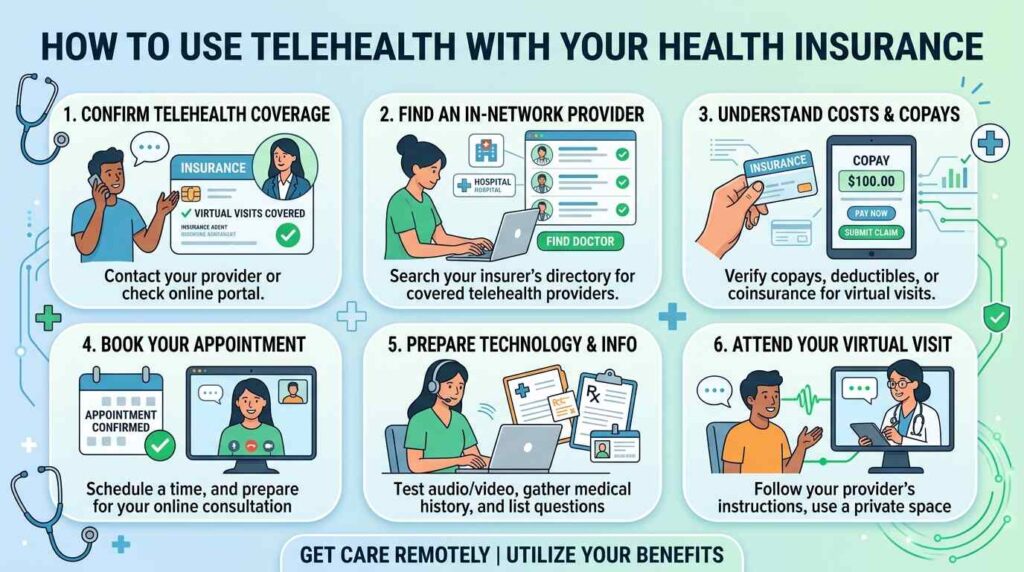
How to Use Telehealth with Your Health Insurance
A few years ago, seeing a doctor from your couch sounded like a novelty. Now it’s a regular part of healthcare. You can talk to a doctor about a rash, refill a prescription, or check in with a therapist without leaving the house.
The tricky part is the money. Will your plan actually pay for it? And what happens if you book the wrong kind of visit? This guide walks you through how to use telehealth with your health insurance, from checking your coverage to understanding the bill afterward.
What Is Telehealth?
Telehealth means getting healthcare services remotely, usually through a video call, phone call, or secure messaging app. You may also hear it called telemedicine or a virtual visit. People use the words in slightly different ways, but for insurance purposes they usually point to the same thing: an appointment with a healthcare provider that doesn’t happen in person.
Common examples include:
- A video visit with a general practitioner for a cold, rash, or other minor problem
- A therapy or counseling session online
- A prescription refill or medication check-in
- A follow-up appointment after surgery or a hospital stay
- A chat with a specialist, such as a dermatologist
Does Health Insurance Cover Telehealth?
In many cases, yes. A lot of insurers now cover telehealth visits, and some plans include a dedicated virtual care service. But coverage isn’t universal, and the details change from one insurer, plan, and country to the next.
The things that usually decide whether you’re covered are:
- Your specific plan. Two plans from the same insurer can treat telehealth differently.
- The type of visit. A routine checkup by video may be covered while a certain specialty visit isn’t.
- The provider. An in-network provider is usually cheaper, and sometimes the only one covered at all.
- Local rules. Laws on telehealth vary, so what applies to a friend abroad may not apply to you.
The only way to know for sure is to check your own plan. Here’s how.
How to Use Telehealth With Your Health Insurance in 7 Steps
1. Read your plan details
Start with the documents your insurer gave you, or log in to your member portal. Search for words like “telehealth,” “telemedicine,” “virtual care,” or “remote consultation.” You’re looking for whether it’s covered, which services are included, and any limits.
2. Call your insurer if it isn’t clear
Policy language can be confusing. A short phone call or chat with customer service can save you a lot of trouble. Ask a few direct questions:
- Is telehealth covered under my plan?
- Which types of visits are included?
- Do I need to use a specific app or provider?
- What will I pay for each visit?
Write down the date, the name of the person you spoke to, and what they told you. If a dispute comes up later, that note helps.
3. Find an in-network telehealth provider
Most insurers have a provider directory. Filter for telehealth or virtual care, and make sure the provider is in your network. Your insurer may also partner with a particular virtual care company, which often means lower costs or even free visits for certain services.
If you already have a doctor you like, ask their office whether they offer video appointments. Seeing someone who already knows your history is usually the better option.
4. Find out your cost before you book
Telehealth isn’t always free. Depending on your plan, you may owe a copay, coinsurance, or the full cost until you meet your deductible. Ask what you’ll pay and whether the amount is the same as an in-person visit. A telehealth copay is often similar to or lower than an office visit, but not always.
5. Book your telehealth appointment
Book through your provider’s website, your insurer’s app, or by phone. Have your insurance details ready, including your member ID. Some providers will ask you to fill out forms or upload your insurance card beforehand, so do that early instead of five minutes before the call.
6. Get set up for the visit
A little preparation makes the appointment go better:
- Test your internet connection, camera, and microphone.
- Choose a quiet, private, well-lit spot.
- Write down your symptoms, questions, and any medications you take.
- Keep your insurance card and ID nearby.
- If it helps, have a thermometer, blood pressure cuff, or similar tool within reach.
7. Check your paperwork afterward
A few weeks later, you should get an explanation of benefits (EOB) or a similar statement from your insurer. Compare it to the bill from your provider. If the amounts don’t match what you were told, or a visit was denied, call your insurer and ask why. Mistakes and miscoding happen more often than people think, and many can be fixed with a phone call or a formal appeal.
What Will You Pay for Telehealth?
Costs depend on your plan, but here are the main ways you might be charged:
- Copay: a fixed amount, such as a set fee per visit.
- Coinsurance: a percentage of the visit cost that you pay after your deductible.
- Deductible: the amount you pay out of pocket before your insurance starts covering costs.
- No cost: some plans waive fees for certain virtual visits, especially through their own telehealth service.
If you don’t have insurance, or a visit isn’t covered, many telehealth services offer a flat self-pay rate. It’s often lower than an in-person visit, so it’s worth comparing.
When Telehealth Isn’t the Right Choice
Telehealth is great for plenty of situations, but not all of them. It’s usually not the best fit when you need a physical exam, lab work, imaging, or a procedure. And it’s never appropriate for an emergency. If you have chest pain, trouble breathing, signs of a stroke, severe bleeding, or any situation that feels life-threatening, call your local emergency number or go to the nearest emergency room.
Common Mistakes to Avoid
- Assuming every provider is covered. Always confirm they’re in your network.
- Skipping the cost question. Surprise bills are the most common complaint.
- Using a service your plan doesn’t recognize. Random apps may not be covered by your insurer.
- Not saving records. Keep screenshots or notes of what you were told about coverage.
- Ignoring the EOB. Reading it takes five minutes and can catch costly errors.
Frequently Asked Questions
Is telehealth cheaper than going to the doctor in person?
Often it is, especially for minor conditions, but it depends on your plan. Check your copay or coinsurance first.
Do I need a referral for a telehealth visit?
Sometimes. If your plan usually requires a referral for specialists, it may require one for virtual specialist visits too.
Can I use telehealth for mental health care?
Yes, many plans cover online therapy and counseling, though the details vary. Ask your insurer about session limits and which providers are covered.
Is telehealth private?
Reputable providers use secure platforms designed to protect your information. Still, take your call in a private space and avoid public Wi-Fi when you can.
What if my insurance denies a telehealth claim?
Call your insurer and ask for the reason. If you think the denial is wrong, you can usually file an appeal, and your provider’s office can often help.
The Bottom Line
Using telehealth with your health insurance isn’t complicated once you know the order of things: check your coverage, pick an in-network provider, confirm your costs, and review the paperwork afterward. A few minutes of homework up front can save you from a frustrating bill later.
If you haven’t tried a virtual visit yet, start with something simple, like a minor concern or a prescription follow-up. You may find it’s the easiest healthcare appointment you’ve ever had.